 Money Made Intelligent.
Every payout, on Autopilot.
Built for drivers and owner-operators, and designed to run your whole financial life. Every chapter, one app.
One app. Every lane.
Built for drivers and owner-operators, and designed to run your whole financial life.
Tax rules vary. Milli estimates and Milli AI are informational and are not tax advice. Tree of Life and the retirement and investing tools offer planning insight, not financial advice. Investing involves risk, including loss of principal. Milli is not a registered investment adviser or broker-dealer.
Four steps. One road.
Connect, organize, estimate, and e-file with Milli.
- 01
Connect
Connect your accounts securely through Plaid (optional) to see earnings and payouts from your driving apps as they arrive in a live view. Prefer not to connect? Enter your earnings and offers manually. You can disconnect any time.
- 02
Organize
Milli logs miles with GPS when you allow it, and keeps receipts, fuel records, settlement statements and 1099s in Tax Vault.
- 03
Estimate
See how much to set aside per week or per payout, with reminders before each quarterly due date.
- 04
File Available now
Automatic Annual Tax Filing is available for Elite members, prepared and filed by a credentialed tax preparer. Review and approve your return before it is electronically filed.

Worth it, or next offer.
Share an offer. Milli Cents tells you if it looks worth the drive.
Milli Cents is the signature feature of Milli. Share a gig offer by screenshot, paste or manual entry, and Milli Cents estimates the dead miles, fuel cost and other trip costs, then tells you whether the offer looks worth taking or whether to move on to the next one. Fuel and cost figures use your own vehicle inputs, such as your miles per gallon, gas price and per-mile costs. These are estimates based on the details you share, not a promise of profit, and Milli does not read offers or trip data from any driving app. Connect your accounts securely through Plaid (optional) and Milli can show your earnings and payouts from your driving apps as they arrive in a live view. Prefer not to connect? Enter your earnings and offers manually.
On the roadA Tuesday night offer pops up: decent pay, but the drop is far from the next busy zone. Share the screenshot, and Milli Cents shows the estimated net after the dead miles back, so you can decide in seconds.
Illustrative example. Milli Cents gives estimates based on the details you share and your own vehicle inputs; actual costs and earnings vary.
- Share offers by screenshot, paste or manual entry
- Dead miles, fuel and trip costs from your own vehicle inputs
- Optional Plaid connection for a live view of payouts, or manual entry

Illustrative example. Demo data shown.

Home, one dial away.
Your whole week at a glance, like the dash of a '54 Bel Air.
Tap the chrome M Dial at the center of the nav bar and you are home. Chrome-ringed gauges show what you earned this week across every app and load, how much Milli suggests setting aside, the miles you logged, and your Tax Ready Score. One look between orders, rides or loads and you know where you stand.
On the roadSunday night after a weekend of Instacart batches, tap the M Dial and see the weekend's earnings, the suggested set-aside, and every logged mile before Monday starts.
- Earnings from every app in one view
- A suggested set-aside that updates as payouts land
- Miles, expenses and your score on one dash

Illustrative example. Demo data shown.

Payouts
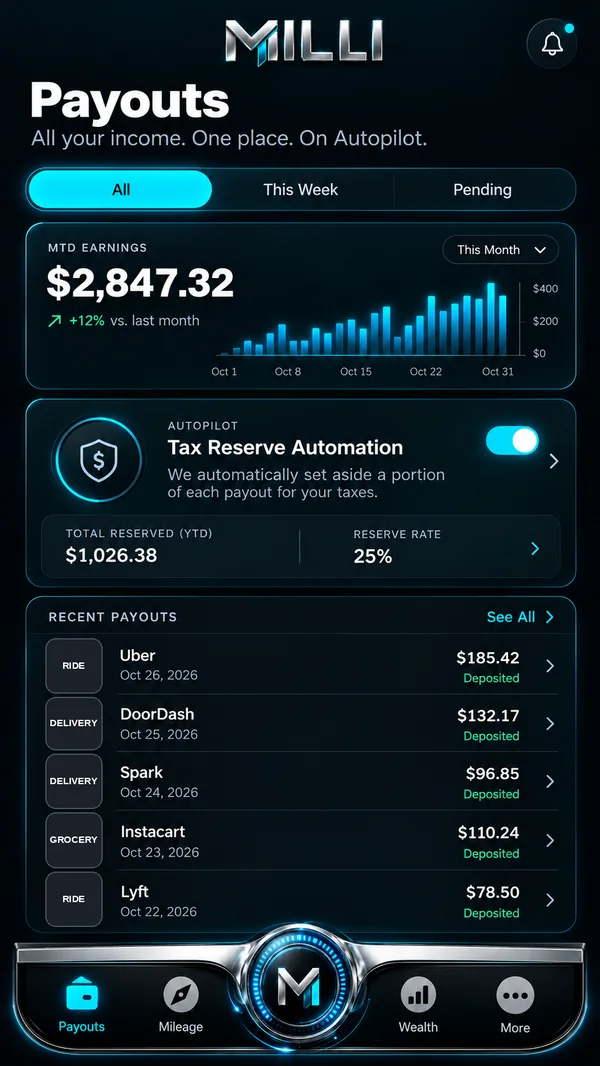
Every payout from every app, in one tab.
Payouts is the running record of what you earn: deposits from each app, loads and settlements, alongside the costs that come out of them, like fuel, tolls, parking, phone, insurance, maintenance and truck payments. Connect your accounts securely through Plaid (optional) to see payouts from your driving apps and brokers as they arrive in a live view, or enter and upload earnings manually. Per-mile and per-load views show what each run actually paid after costs.
On the roadA box-truck courier enters the settlement for a three-stop load, plus the fuel and tolls from the run. Payouts shows what that load paid per mile.
- Live payout view through optional Plaid, or manual entry
- Per-mile and per-load views for owner-operators
- Expenses tagged as you go, ready for your records
Illustrative example. Demo data shown.

Mileage
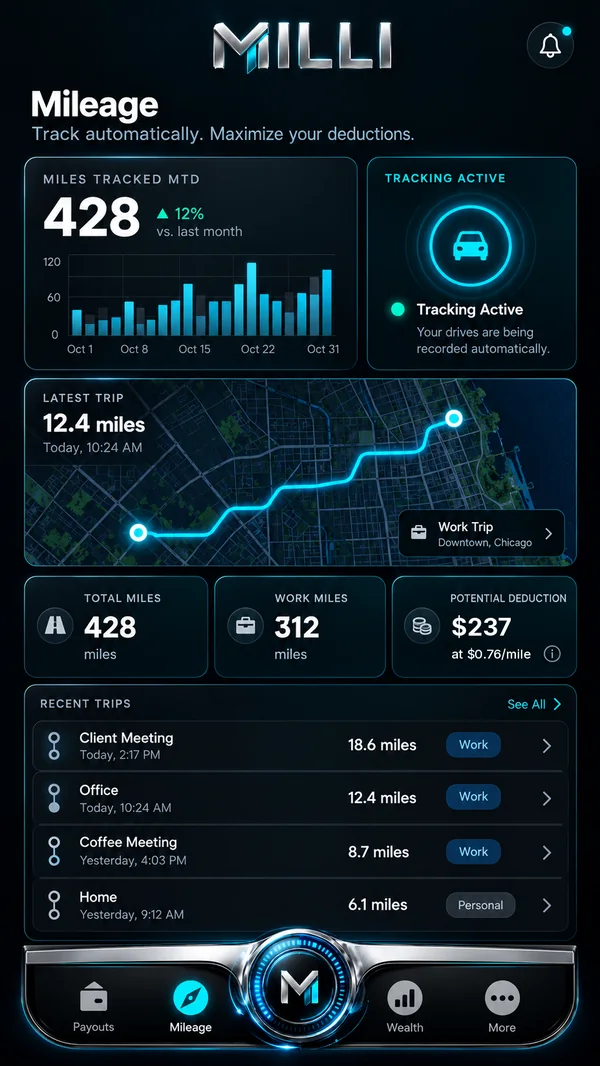
Every business mile, logged while you drive.
With your permission, Mileage logs trips with GPS as you drive, maps each one, and lets you mark it business or personal. Milli shows a potential deduction estimate for your business miles based on the IRS standard mileage rate, which changes by year; whether you can deduct them, and how much, depends on your situation. Logs are saved to your Tax Vault with the tax year they belong to.
On the roadAn Amazon Flex block, a lunch break, then two hours of rideshare. Mileage keeps the work miles and lets you mark the lunch run personal with one tap.
- GPS trip logging with your permission
- Business or personal, one tap per trip
- Logs saved to your Tax Vault, ready for tax time
Illustrative example. Demo data shown.

Tax Vault
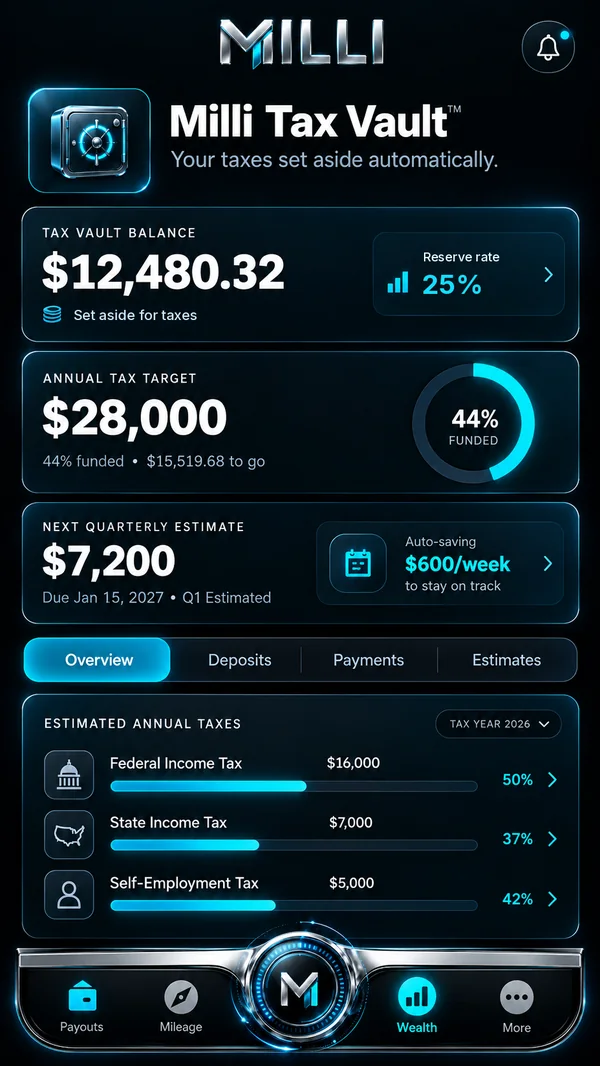
Every receipt, mileage log and 1099, in one place.
Drivers collect paperwork from everywhere: a 1099 from each platform or broker, gas and toll receipts, phone bills and insurance statements. Owner-operators add fuel records, maintenance receipts and settlement statements. Tax Vault, found under the Wealth tab, keeps all of it organized by tax year, so nothing lives in a glovebox when it is time to file.
On the roadAn Amazon Flex block ends at a gas station. Snap the receipt, and it lands in Tax Vault next to that block's mileage log.
- Upload the 1099s you receive from each platform or broker
- Scan receipts for fuel, tolls, parking, phone and maintenance
- Keep mileage logs, fuel records and settlement statements ready for tax time
Illustrative example. Demo data shown.

Receipts & Expenses
Point, scan, done. Every business expense, filed where it belongs.
Add and scan receipts and business expenses as they happen: fuel, tolls, parking, phone, car washes, maintenance, insurance and, for owner-operators, truck repairs and fuel records. Milli AI reads the merchant, amount and date, suggests a category you confirm, and saves the record straight into Tax Vault with the tax year it belongs to.
On the roadBetween Instacart batches, a car wash and a parking meter. Two quick scans, and both expenses sit in Tax Vault before the next order loads.
- Scan paper receipts or add expenses by hand
- Categories suggested by Milli AI, confirmed by you
- Saved to Tax Vault automatically, ready for tax time

Illustrative example. Demo data shown.
Tax Ready Score
Know how ready your records are, any day of the year.
The Tax Ready Score is a 0 to 100 measure of how complete your records are: earnings entered, receipts categorized, miles logged, and estimated payments on track. It points to the next thing to fix, in plain language, so tax season is a checklist instead of a scramble.
On the roadAfter a busy month of rideshare, the score dips because two days of miles are missing. Milli shows which days, so you can fill them in while you still remember the trips.
- One score for the state of your records
- The next task, explained in plain language
- A readiness measure, not a prediction of what you owe
Illustrative example. Demo data shown.

Quarterly Estimates
How much to set aside, per week or per payout.
Nobody withholds tax from app payouts or load settlements, and self-employed earners are generally expected to make estimated payments during the year. Milli estimates how much to set aside from each payout or each week, based on what you have earned and spent so far, and reminds you before each quarterly due date.
On the roadA Tuesday night on DoorDash and Uber Eats brings in two payouts. Milli suggests a set-aside for each, so Friday's transfer to savings is already decided.
- A set-aside number for every payout or every week
- Reminders before each quarterly due date
- Planning figures that update as your year changes
Illustrative example. Demo data shown.

Milli AI
She learns how you work, and gets more useful the longer you drive with her.
Milli AI is an assistant that can take on tasks for you, like setting reminders, sorting expenses or drafting a set-aside plan, and she asks for your approval before she acts. She learns more the more you tell her, and from the information gathered in Milli over time, such as your usual shifts, apps and vehicle costs, so her answers become more personal. She can be wrong, so check anything important. Milli AI is informational and is not a CPA, attorney, enrolled agent or licensed financial adviser, and tax rules vary.
On the roadAfter a month, she knows you drive DoorDash on weeknights and haul a regional load on weekends. Ask “What should I set aside this week?” and she answers with your own pattern in mind.
You stay in control: review, correct, or delete what Milli AI has learned about you at any time.
- Personalization that improves the more you share
- Takes on tasks only with your approval
- You stay in control: review, correct or delete what she has learned
What can I deduct as a delivery driver?
Drivers commonly keep records of business miles or actual vehicle costs, plus phone use for work, parking and tolls. Which method fits depends on your situation, and rules vary, so confirm with a tax professional.
You told me you mostly drive evenings. Want a reminder to log miles at 11 PM? I will only set it if you say yes.
Yes, set it.
Illustrative example. Demo data shown.

Tree of Life
Life changes. Your plan grows with it.
Add the life events ahead of you, such as a new baby, moving, a new vehicle, a slow season, buying a home or starting a side business, and Tree of Life grows a branch for each one. Milli gives planning insight for every branch: what to set aside, when to start, and how your estimates and budget might shift. It is planning insight to help you save, plan and adjust, not financial advice.
On the roadA delivery driver expecting a baby in March adds the event in October. Tree of Life suggests a weekly amount to set aside before the slower weeks, and adjusts the quarterly estimate reminder to match.
- Branches for the life events you add
- Saving and planning insight for each event
- Planning insight, not financial advice

Illustrative example. Demo data shown.

Wealth
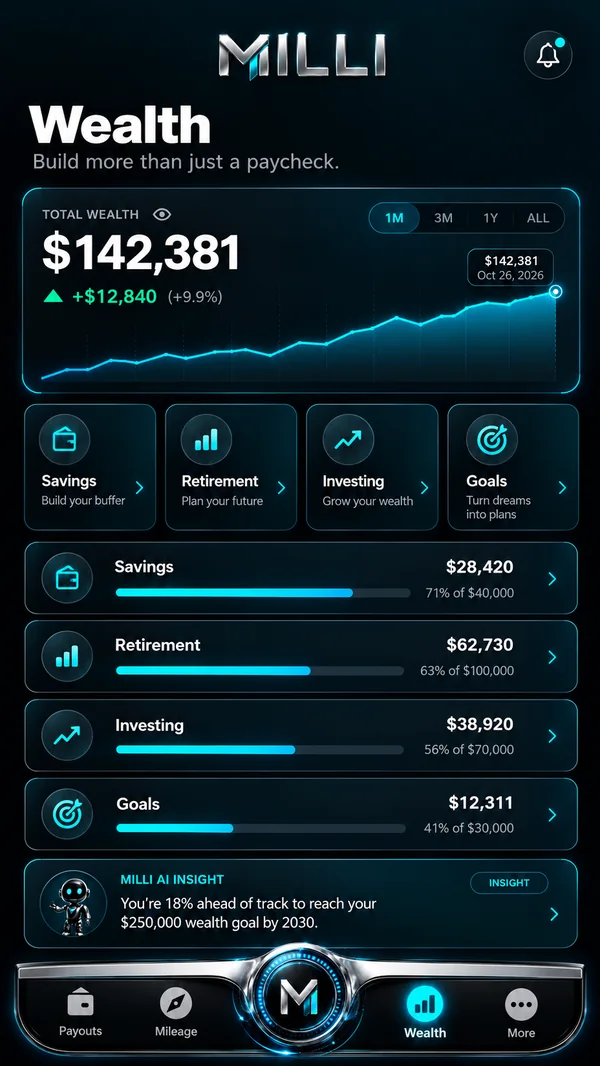
Turn good weeks into a long-term plan.
The Wealth tab brings savings goals, net worth, your Tax Vault and your Tree of Life plans into one view, so the money from a strong week has somewhere to go. It shows progress toward the goals you set and connects them to your set-aside and estimate numbers.
On the roadAn owner-operator pays off the truck. Wealth shows the monthly payment that is now free, and helps plan where it goes next.
Investing involves risk, including loss of principal. Milli is not a registered investment adviser or broker-dealer.
- Savings goals and net worth in one place
- Linked to your Tree of Life events
- Planning views, not financial advice
Illustrative example. Demo data shown.
Retirement & Investing
Self-employed does not mean no retirement plan.
Milli is building retirement and investing insights and planning tools for drivers and owner-operators: set a retirement goal, see a contribution idea based on your average week, and learn how 401(k) and other retirement options generally work for the self-employed. These features are coming. Milli does not offer investment advice, manage money, hold funds, or open 401(k) or brokerage accounts.
On the roadA rideshare driver with no employer plan sets a retirement goal. Milli shows what a steady weekly contribution could look like and explains the options to discuss with a licensed professional.
Investing involves risk, including loss of principal. Milli is not a registered investment adviser or broker-dealer.
- Retirement goals and contribution ideas
- Plain explanations of retirement and investing basics
- Features coming, with planning insight only
Illustrative example. Demo data shown.

Three Plans
Pick the plan that fits your road.
Basic is $19.99 a month with a 3-day free trial: Automatic Tax Slicing, Real-time Mileage Tracking and Tax Vault access. Pro is $29.99 a month: everything in Basic plus AI Receipt and Expense Management and the Priority AI Tax Assistant. Elite is $49.99 a month: everything in Pro plus Milli Cents offer estimates, Tree of Life planning insight, quarterly tax payments through licensed partners, retirement and investing insights and planning tools as they arrive, the Milli Elite Card at card launch, and Automatic Annual Tax Filing. Prepared and filed by a credentialed tax preparer.
On the roadA part-time rideshare driver starts on Basic. A full-time delivery driver who wants AI receipt scanning moves to Pro. An owner-operator who wants annual filing handled chooses Elite.
- Cancel anytime, no hidden fees
- Elite: Automatic Annual Tax Filing
- Compare every feature on the Pricing page
Illustrative example. Demo data shown.
Built for the long haul.
Taxes organized, estimates ready, e-filing available.
The Milli Elite Card. Coming Soon.
Brushed titanium. Cyan edge. Built for those who move differently.
Card issuing details will be disclosed before card launch. Available to Elite members at card launch, subject to identity verification. Milli is not FDIC insured and does not hold customer funds or offer deposit accounts.

Be among the first when Milli launches.
Join the early access list and we will email you the moment Milli arrives on the App Store and Google Play on October 28, 2026.